
Best overall: activity-based zoning. Best for teams working on shared deliverables: a project neighbourhood. Best for adapting an existing room: a flexible project room. This Giant Leap guide compares the best collaborative workspace designs 2026 by the work they support, the distractions they create and the changes each layout requires.
TL;DR
- Giant Leap’s best collaborative workspace designs 2026 guide puts activity-based zoning first for teams mixing collaboration and focused work.
- Choose project neighbourhoods for shared deliverables, or flexible project rooms for changing workshop formats.
- Hybrid meeting rooms suit mixed-location discussions; quiet collaboration suites suit sensitive conversations.
- Judge office layouts by acoustics, accessibility and task fit, not by how open they look.
Why this matters
Collaboration is not a single activity. A design review needs shared visual material; a confidential discussion needs privacy; a remote participant needs to hear the conversation rather than watch colleagues talk across a room.
A workspace designed only around bringing people together leaves those differences unresolved. You need places to discuss, places to concentrate and a clear way to move between them without disturbing another team.
For your 2026 office brief, start with the activities you need to accommodate. Choose the layout around the work, then choose the furniture. A striking communal table does not answer questions about noise, access, confidentiality or remote participation.
What makes the best collaborative workspace designs
Use these criteria before comparing layouts. They separate a useful collaboration space from an attractive room that people avoid.
- Task fit: Match the setting to the activity: discussion, shared production, presentation or quiet review. Give each space a clear purpose.
- Acoustic separation: Keep energetic conversation away from concentration areas. Furniture placement alone does not provide speech privacy.
- Shared visibility: Make drawings, documents and displays visible from the seats people actually use. Avoid layouts where participants repeatedly turn away from each other.
- Inclusive access: Keep routes clear and provide usable seating and work surfaces. Assess accessibility against applicable local requirements rather than appearance.
- Adaptability: Choose movable elements where the activity changes. Keep fixed infrastructure where predictable equipment placement matters more.
- Operational clarity: Define how people book, use and reset shared spaces. A flexible room needs a storage location, not just furniture that moves.
Ask the people who perform the work to review the proposed layout. A facilities checklist identifies physical constraints; users identify the conversations, materials and interruptions the room must accommodate.
Collaborative workspace designs at a glance
These are layout approaches, not named furniture products. Each takes a different use-case slot so you can choose by need rather than treat the ranking as a shopping list.
1
- Design: Activity-based zoning
- Best for: Mixed collaboration and concentration
- Standout feature: Distinct settings for different tasks
- Key limitation: Needs clear boundaries and enough usable space
2
- Design: Project neighbourhood
- Best for: Teams producing shared deliverables
- Standout feature: Shared work surfaces beside team workstations
- Key limitation: Conversation can disturb nearby focused work
3
- Design: Flexible project room
- Best for: Changing workshop formats
- Standout feature: Movable furniture and reusable working surfaces
- Key limitation: Requires reset routines and storage
4
- Design: Hybrid meeting room
- Best for: Mixed-location discussions
- Standout feature: Layout planned around remote participation
- Key limitation: Equipment and room acoustics need coordination
5
- Design: Collaboration hub
- Best for: Informal cross-team exchanges
- Standout feature: A visible shared destination
- Key limitation: Unsuitable for confidential or sustained noisy work
6
- Design: Quiet collaboration suite
- Best for: Sensitive discussions and concentrated review
- Standout feature: Enclosed setting separated from open-office activity
- Key limitation: Occupies enclosed space and requires booking discipline
1. Activity-based zoning: best for mixed working styles
Activity-based zoning separates an office into settings for conversation, shared work and concentration. People select the setting that suits their current task instead of expecting a single desk arrangement to support everything.
Best for: Teams whose working day alternates between individual tasks and group discussion.
For a 2026 layout brief, define 3 functional zones: collaboration, focus and transition. These are planning categories, not a prescribed room count. Transition space gives people a route between activities without turning the edge of a quiet area into an impromptu meeting point.
Activity-based zoning pros
- Gives conversation and concentration distinct places.
- Supports different activities without treating every task as a meeting.
- Makes it easier to explain where particular behaviours belong.
Activity-based zoning cons
- Weak boundaries allow noise and foot traffic to cross into focus areas.
- Shared settings need rules for occupancy, belongings and cleaning.
- A cramped floorplate limits meaningful separation.
Start by placing the loudest activities, then protect the quietest ones. Do not label an exposed desk cluster a focus zone while leaving it beside the main circulation route.
Verdict: Buy into activity-based zoning as the default approach when your office must support both collaboration and concentration.
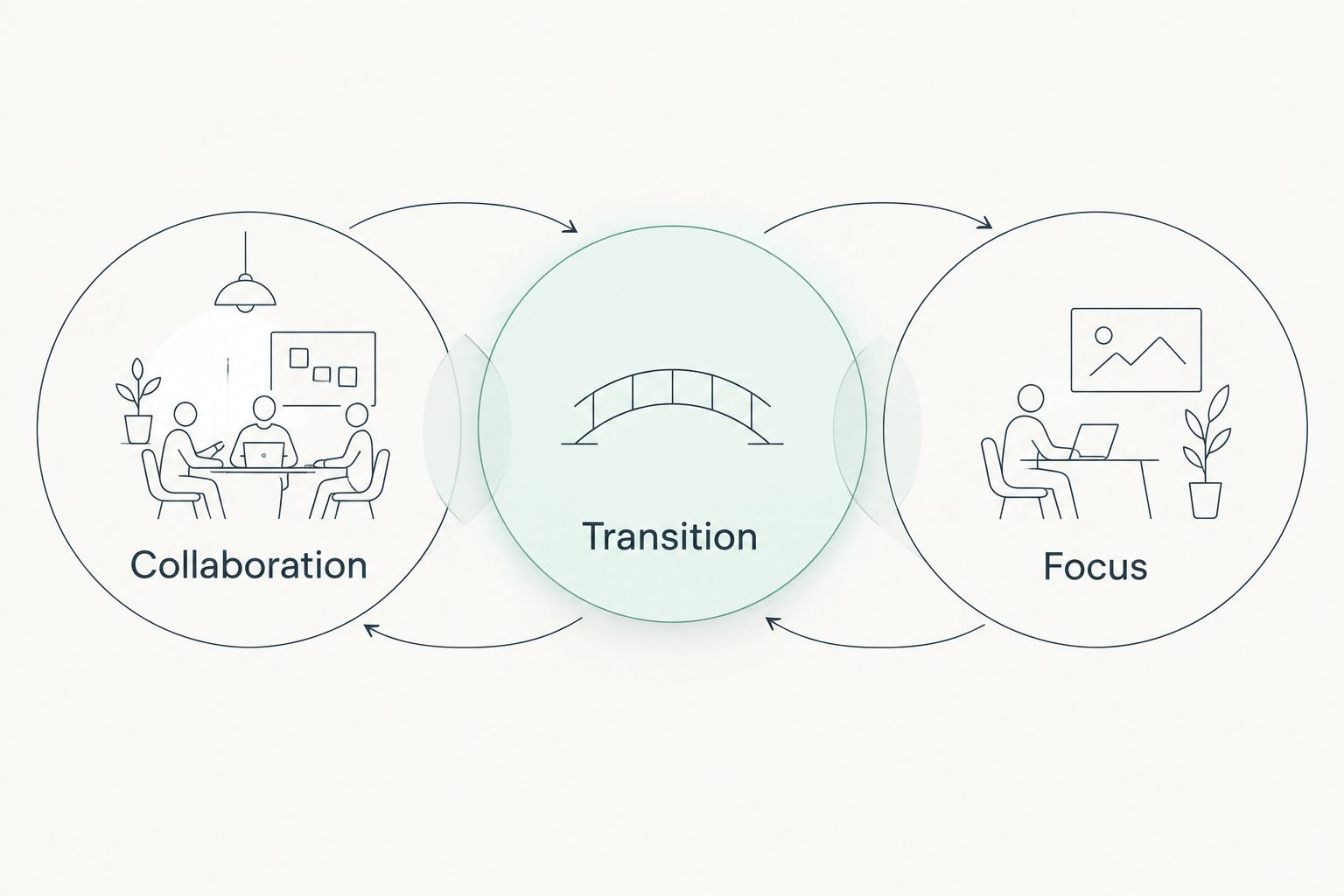
Plan the route between activities as carefully as the activity spaces themselves.
2. Project neighbourhood: best for shared deliverables
A project neighbourhood groups a working team around shared surfaces, reference material and nearby discussion space. It keeps the current project visible without requiring every update to move into a separate meeting room.
Best for: Teams reviewing drawings, developing proposals or coordinating a shared piece of work.
Arrange the neighbourhood around the material people discuss. A drawing review needs somewhere to spread documents; a screen-led review needs sightlines to a shared display. Those needs produce different furniture arrangements.
Project neighbourhood pros
- Keeps project material close to the team using it.
- Supports quick questions without relocating the whole group.
- Gives a project an identifiable shared working area.
Project neighbourhood cons
- Frequent discussion competes with individual concentration.
- Visible documents require controls when information is sensitive.
- Team-specific space needs reassignment when projects change.
Keep 2 settings distinct: individual workstations and the shared review area. Putting a discussion surface inside a desk cluster does not remove the need for somewhere quieter when a colleague needs uninterrupted work.
For a 2026 project neighbourhood, decide what stays on display and what returns to storage. Treat the shared surface as working space rather than permanent overflow storage.
Verdict: Buy into a project neighbourhood when a stable team needs shared material close at hand; skip it as the only setting for focused work.
3. Flexible project room: best for changing workshop formats
A flexible project room uses movable tables, suitable seating and reusable display surfaces to support different group activities. The room changes between discussion, document review and workshop arrangements rather than holding a fixed meeting-table layout.
Best for: Teams that need to adapt an existing room for different collaborative sessions.
Flexibility depends on the complete room, not just furniture with castors. Power access, storage, circulation and the position of displays determine which layouts are practical.
Flexible project room pros
- Accommodates different seating and working arrangements.
- Keeps active workshops out of nearby desk areas.
- Lets teams leave a working layout in place during an ongoing session.
Flexible project room cons
- Rearranging and resetting the room requires effort.
- Unused furniture needs somewhere to go.
- Fixed power or displays can restrict the layouts that work.
Set 1 default layout and document how to restore it. Then identify the alternative arrangements the room genuinely supports. A room is not flexible if every change blocks a door or leaves someone without a usable work surface.
Verdict: Buy into a flexible project room when session formats change; hold if there is no storage or responsibility for resetting it.
The arrangement below illustrates a workshop setting with shared surfaces, movable furniture and unobstructed access. Check the alternatives against those same practical requirements before approving the room.

Movable furniture only helps when the rearranged room remains usable.
4. Hybrid meeting room: best for mixed-location discussions
A hybrid meeting room organises seating, cameras, microphones and shared content around participation from inside and outside the office. Its purpose is to make the discussion accessible to remote participants, not simply to add a camera to a conventional room.
Best for: Teams that regularly discuss work with colleagues joining remotely.
Plan the camera view from occupied seats. Check where people look when reviewing content, whether faces remain visible and whether a speaker can be heard from each intended position.
Hybrid meeting room pros
- Gives remote participation an explicit place in the layout.
- Creates a repeatable setting for mixed-location meetings.
- Supports shared content without relying on a single participant’s laptop position.
Hybrid meeting room cons
- Audio, lighting and furniture decisions need coordination.
- Equipment alone cannot correct a poorly arranged room.
- Informal side conversations remain difficult for remote participants to follow.
For your 2026 hybrid room, assess 2 views: people and shared content. Both need to work during the same discussion. A camera view that looks acceptable in an empty room is not enough.
Test the layout with participants seated and someone joining remotely. Include document sharing and ordinary conversation in that check rather than testing only whether the call connects.
Verdict: Buy into a hybrid meeting room when remote colleagues regularly participate; skip a camera-only retrofit as the complete design solution.
5. Collaboration hub: best for informal cross-team exchanges
A collaboration hub is a shared destination for short conversations and informal exchanges. It sits outside individual team territories and gives people somewhere to talk without gathering around someone’s workstation.
Best for: Offices that need a recognisable place for casual cross-team interaction.
Place the hub where people can find it without routing every conversation past quiet desks. Use a mixture of seating and working surfaces suited to the intended activities rather than treating lounge furniture as sufficient on its own.
Collaboration hub pros
- Provides a clear alternative to desk-side conversations.
- Gives different teams a shared meeting point.
- Supports informal discussion without the formality of a booked room.
Collaboration hub cons
- Open conversation offers little confidentiality.
- A busy hub can introduce noise into adjacent areas.
- Informal seating does not suit every document-heavy task.
Define what belongs here. Brief exchanges and casual discussion fit the purpose; extended calls, sensitive reviews and noisy workshops require another setting.
Do not position the hub solely because a central space looks impressive on a plan. Check how sound and movement affect the workstations around it, and retain a clear route through the area.
Verdict: Buy into a collaboration hub for informal exchange; skip it as a replacement for meeting rooms or project workspaces.
6. Quiet collaboration suite: best for sensitive discussion
A quiet collaboration suite is an enclosed setting for conversations and reviews that need separation from open-office activity. It combines a shared work surface with a layout suited to discussion rather than treating privacy as an incidental benefit.
Best for: Sensitive conversations, concentrated document review and discussions that should not interrupt nearby colleagues.
Enclosure alone does not establish acoustic privacy. Assess doors, partitions, ventilation paths and adjoining spaces against the intended use. Apply appropriate professional guidance when specifying the construction.
Quiet collaboration suite pros
- Separates discussion from open-office distractions.
- Provides somewhere to review sensitive material away from shared displays.
- Gives concentrated group work a dedicated setting.
Quiet collaboration suite cons
- Enclosed rooms use space that cannot serve other activities simultaneously.
- Privacy depends on construction and operating practices.
- Long bookings can prevent others from using the room.
Choose furniture that supports the actual work. A compact review table suits shared documents; lounge seating alone makes that activity awkward. Keep the room’s purpose explicit so it does not become a permanent personal office.
Verdict: Buy into a quiet collaboration suite when separation is essential; hold until privacy requirements and booking rules are defined.
How the designs are ranked
Giant Leap’s collaborative workspace designs guide ranks activity-based zoning first because it addresses the broadest brief: conversation and concentration within the same workplace. The other approaches answer narrower requirements and should be selected on that basis.
The ranking uses task fit, acoustic separation, shared visibility, inclusive access, adaptability and operational clarity. It compares layout principles, not measured performance results or named product specifications.
For your 2026 shortlist, reject any design that fails a non-negotiable requirement. A flexible workshop room does not substitute for confidential space; an enclosed room does not automatically support remote participants.
Which collaborative workspace design should you choose?
Choose activity-based zoning unless your brief identifies a more specific need. It gives you a framework for deciding where other settings belong rather than asking a single room to solve every working requirement.
Then add the setting your work demands:
- Choose a project neighbourhood for ongoing shared deliverables.
- Choose a flexible project room for changing workshop formats.
- Choose a hybrid meeting room for mixed-location participation.
- Choose a collaboration hub for informal cross-team exchanges.
- Choose a quiet collaboration suite for sensitive or concentrated discussion.
Before committing, mark the proposed activities on the floor plan. Trace routes, identify noise conflicts and check where materials will be displayed or stored. Resolve those conflicts before selecting finishes.
FAQ
What are the best collaborative workspace designs for 2026?
Activity-based zoning is the best default for offices that need both collaboration and concentration. Project neighbourhoods, flexible project rooms, hybrid meeting rooms, collaboration hubs and quiet suites address more specific working requirements.
Is an open-plan office the best layout for collaboration?
An open-plan office is not a complete collaboration strategy. It brings people into a shared area but still needs settings for focused work, private conversation and discussions that would disturb nearby colleagues.
Which collaborative design works best in an existing meeting room?
A flexible project room suits an existing room that needs to support changing session formats. Check storage, access, power and display positions before choosing movable furniture.
What makes a meeting room suitable for hybrid collaboration?
A hybrid meeting room needs usable views of people and shared content, together with audio that supports participation. Test the arrangement with seated colleagues and a remote participant rather than checking equipment in an empty room.
How do you stop collaboration spaces disturbing focused work?
Separate active discussion from focus areas through location, circulation and appropriate acoustic design. A sign naming an area a quiet zone does not prevent sound from reaching it.
Can one room support every kind of collaboration?
One room should not be expected to support every collaborative activity equally well. Confidential discussions, changing workshops and remote meetings place different demands on enclosure, furniture and equipment.
Who is Giant Leap’s collaborative workspace designs guide best for?
Giant Leap’s collaborative workspace designs guide is best for office planners comparing layouts before choosing furniture. It explains which activities each setting supports and the limitations to address in the design brief.
One last thing
Check where the displaced work goes. Every collaboration space replaces something: desks, storage, circulation or another shared setting. Naming the replacement without accounting for that displaced function leaves the plan unfinished.
Before approving your layout, ask where someone goes when the collaboration area is occupied, noisy or unsuitable for their task. That answer is the final check on whether your office offers useful choices rather than just different-looking furniture.