
Best overall: an activity-zoned layout. Best for close team collaboration: team neighbourhoods. Best for reusing existing furniture: zoned bench seating. Giant Leap’s guide to the best open-plan office layouts for productivity 2026 compares five arrangements by the work they support, the distractions they control and the compromises you need to accept.
TL;DR
- Giant Leap’s best open-plan office layouts for productivity 2026 guide picks activity zoning for mixed-work offices.
- Choose team neighbourhoods for frequent coordination; keep quiet work outside the collaboration area.
- Perimeter focus layouts suit concentration-heavy work when circulation stays away from desks.
- Zoned bench seating suits furniture reuse, but desk dividers do not replace enclosed call spaces.
Why this matters
An open floor is not a working system. If calls, concentrated work and informal meetings share the same space, employees must negotiate conflicting needs throughout the day. Your layout needs to tell people where each activity belongs.
For your 2026 office plan, start with tasks rather than desk capacity. Write down which activities require conversation, which require quiet and which need privacy; then decide what deserves separation. Use this Giant Leap guide to choose a layout brief before choosing individual furniture pieces.
The best open-plan layout separates incompatible activities without making everyday collaboration difficult. That is the standard behind the ranking below, not a promise that one floor plan produces a measured productivity increase.
What makes the best open-plan office layout?
- Acoustic separation: Give calls and conversations somewhere to happen without relying on everyone else to tolerate them. Furniture screens define territory; they are not substitutes for enclosed rooms.
- Task fit: Match settings to actual work. A team that spends its day coordinating needs a different arrangement from employees who mostly write, analyse or review documents.
- Clear circulation: Keep routes to entrances, meeting rooms and shared facilities away from concentration areas. Avoid turning a quiet desk cluster into a shortcut.
- Usable shared spaces: Position collaboration areas where employees can reach them without gathering around someone else’s workstation. Specify what each space is for.
- Workstation comfort: Check desk placement, screen reflections, seating adjustment and access to daylight together. A good zoning plan does not correct an uncomfortable workstation.
- Operating clarity: Decide how people use quiet areas, take calls and share desks. Physical boundaries need matching behaviour rules.
Treat these criteria as a design brief for 2026, not as a furniture shopping list. Before approving a plan, ask someone unfamiliar with it to identify the quiet area, conversation area and main walking route. If those functions are unclear, revise the arrangement.
Open-plan office layouts at a glance
Activity-zoned layout
- Best for: Offices mixing individual and collaborative work
- Standout feature: Separate settings for different tasks
- Key limitation: Needs enough distinct spaces to make the zones meaningful
Team neighbourhoods
- Best for: Teams with frequent internal coordination
- Standout feature: Shared team space beside team desks
- Key limitation: Team conversations need a boundary from neighbouring desks
Perimeter focus layout
- Best for: Concentration-heavy work
- Standout feature: Quiet desks away from central social activity
- Key limitation: Window glare and perimeter circulation need careful planning
Zoned bench seating
- Best for: Reusing an existing bench-desk arrangement
- Standout feature: Keeps desk groups while relocating distracting activities
- Key limitation: Shared rows remain exposed to nearby speech and movement
Hub-and-spoke layout
- Best for: Hybrid teams meeting for planned collaboration
- Standout feature: A shared collaboration hub with quieter surrounding settings
- Key limitation: The hub can become a disturbance for surrounding workstations
The table ranks task suitability, not furniture quality. Each option can work badly if meeting spaces, walking routes or usage rules contradict its intended purpose.
1. Activity-zoned layout: best open-plan layout for mixed work
An activity-zoned office separates focused work, informal collaboration, calls and social activity into recognisable settings. Employees choose the setting that matches their task rather than expecting one desk to accommodate everything. The arrangement works best when movement between settings is straightforward.
For a 2026 redesign, begin by separating speech-heavy activities from quiet work. Place shared amenities beside the social or collaboration zone, not inside the concentration zone. Keep enclosed settings available for work that needs speech privacy.
Activity-zoned layout pros:
- Gives concentrated work an explicit place in the office.
- Provides an alternative to discussing projects beside occupied desks.
- Supports different working modes within the same floor plan.
- Makes noise expectations easier to explain through physical boundaries.
Activity-zoned layout cons:
- A small floor plate can leave zones too close together to function differently.
- Employees moving between settings need suitable storage and access to their work.
- Without clear rules, a nominally quiet zone can become another conversation area.
Best for: Offices where employees alternate between independent tasks, calls and collaboration.
Do not confuse activity zoning with compulsory hot-desking. You can retain assigned desks and still add separate places for calls and group work. The decision is about where activities happen, not automatically about who owns a workstation.
Verdict: Buy into activity zoning as the default brief for mixed-work offices; skip decorative zones with no practical separation.
2. Team neighbourhoods: best open-plan layout for close coordination
Team neighbourhoods group people who regularly work together and give them a nearby shared setting for discussion. The neighbourhood can include desks, a project table and a place to review work. Its boundary should stop the team’s conversations becoming everyone else’s background noise.
Seat by working relationships rather than job title alone. Map who needs frequent access to whom, then put those connections close together without blocking access to other teams. Provide somewhere separate for conversations that outgrow a quick exchange.
Team neighbourhood pros:
- Keeps everyday coordination close to the people involved.
- Gives shared project materials a defined home.
- Establishes a recognisable meeting point for the team.
- Can preserve assigned seating where employees need it.
Team neighbourhood cons:
- Informal conversations can interrupt teammates who are concentrating.
- Strong team boundaries can make cross-team contact less convenient.
- Changing team sizes can leave the arrangement mismatched to current work.
Best for: Teams whose members coordinate frequently on shared tasks.
A neighbourhood is not permission to hold every discussion at the desks. Put the team’s collaboration setting near its workstations, but distinguish the two. Give people permission to leave the neighbourhood for quiet work without treating that choice as disengagement.
Verdict: Buy into team neighbourhoods for coordination-heavy teams; hold if most employees need uninterrupted individual work.
3. Perimeter focus layout: best open-plan layout for concentration
A perimeter focus layout places quiet workstations along suitable outer edges of the office while keeping social and collaborative functions elsewhere. Its value comes from protected desk placement, not simply from putting people beside windows. The perimeter must stay out of the main circulation route.
Position screens with daylight and reflections in mind. Check the desk from a seated position, including the direction employees face, rather than assuming that every window-facing workstation is comfortable. Keep access to shared facilities from cutting through the quiet area.
Perimeter focus layout pros:
- Creates a legible boundary for concentration-focused work.
- Keeps quiet desks apart from a central collaboration area.
- Makes it easier to identify routes that should avoid workstations.
- Allows assigned desks to remain the primary working setting.
Perimeter focus layout cons:
- Glare and changing daylight require attention at individual desks.
- A perimeter used as a walkway undermines the quiet-work objective.
- An open edge still needs acoustic planning; distance alone is not sound isolation.
Best for: Offices where individual analysis, writing or document work dominates the working day.
In a 2026 layout review, look beyond how attractive the window seats appear on a plan. Check blinds, lighting control, nearby doors and the route to meeting rooms. A focus desk beside a busy doorway is a focus desk in name only.
Verdict: Buy into a perimeter focus layout when you can protect the edge from conversation and through-traffic; skip it when the perimeter is the main route.
4. Zoned bench seating: best open-plan layout for furniture reuse
Zoned bench seating keeps existing desk rows but changes how the surrounding office works. Calls, informal meetings and shared equipment move into defined settings away from the benches. Desk orientation and routes are reviewed before replacing usable furniture.
This is a reuse strategy, not a claim about the cheapest fit-out. Keep the benches only if they support comfortable workstations and leave usable circulation space. Reusing an unsuitable arrangement preserves the problem as well as the furniture.
Zoned bench seating pros:
- Lets you retain suitable desks while changing activity placement.
- Keeps team seating understandable and consistent.
- Makes circulation and shared-space changes the first design decisions.
- Avoids treating furniture replacement as the answer to every distraction.
Zoned bench seating cons:
- Shared rows expose employees to nearby speech and movement.
- Screens do not provide the privacy of an enclosed room.
- Existing desk dimensions and placement can restrict the redesign.
Best for: Offices with usable bench desks that need a clearer separation between desk work and conversation.
Start by identifying what happens at the benches that should happen elsewhere. A video call, project discussion and quiet task do not need the same setting. Relocate the conflicting activities before adding dividers and expecting them to solve the whole issue.
Verdict: Hold suitable benches and redesign the surrounding zones; skip a divider-only response to noise.
5. Hub-and-spoke layout: best open-plan layout for hybrid collaboration
A hub-and-spoke layout puts shared collaboration space at the centre of the working arrangement, with quieter settings around it. The hub serves planned group work; the surrounding areas support the individual tasks employees still need to complete. The design needs a clear boundary between those functions.
For a 2026 hybrid-work brief, plan around what employees do when they attend, not just how many desks fit. Locate the hub where arriving groups can reach it without passing through quiet workstations. Keep calls and confidential discussions in appropriate separate settings.
Hub-and-spoke layout pros:
- Gives visiting or hybrid teams an obvious gathering point.
- Makes planned collaboration a visible part of the office.
- Provides a clear distinction between group and individual settings.
Hub-and-spoke layout cons:
- Hub conversations can disturb the surrounding work areas.
- An oversized hub can squeeze out settings needed for individual work.
- Competing group activities need booking or usage rules.
Best for: Hybrid teams that attend the office for planned collaboration and still need space for independent tasks.
Verdict: Buy into a hub-and-spoke layout when collaboration is the main reason for attendance; hold if quiet work dominates.
How the layouts were ranked
Giant Leap’s open-plan office layout ranking prioritises task fit, separation of conflicting activities and clear circulation. Activity zoning takes the default position because it explicitly provides for different working modes. The remaining options each serve a narrower brief.
These are planning recommendations, not results from a comparative productivity trial. No layout earns a universal productivity claim. Choose the arrangement that fits your work, then check whether employees can use it as intended.
Check the layout before committing
Use this sequence to turn a preferred arrangement into a practical brief:
- Map tasks: Identify quiet work, calls, group discussion and confidential activity.
- Separate conflicts: Give incompatible activities different settings.
- Trace routes: Follow movement from the entrance to desks, amenities and meeting spaces.
- Check workstations: Review seating, screen position, lighting and usable desk space.
- Review use: Ask employees whether the intended settings support their tasks.
The sequence matters: choose furniture after deciding how the office needs to work. Otherwise, the available desk arrangement becomes the brief by default.
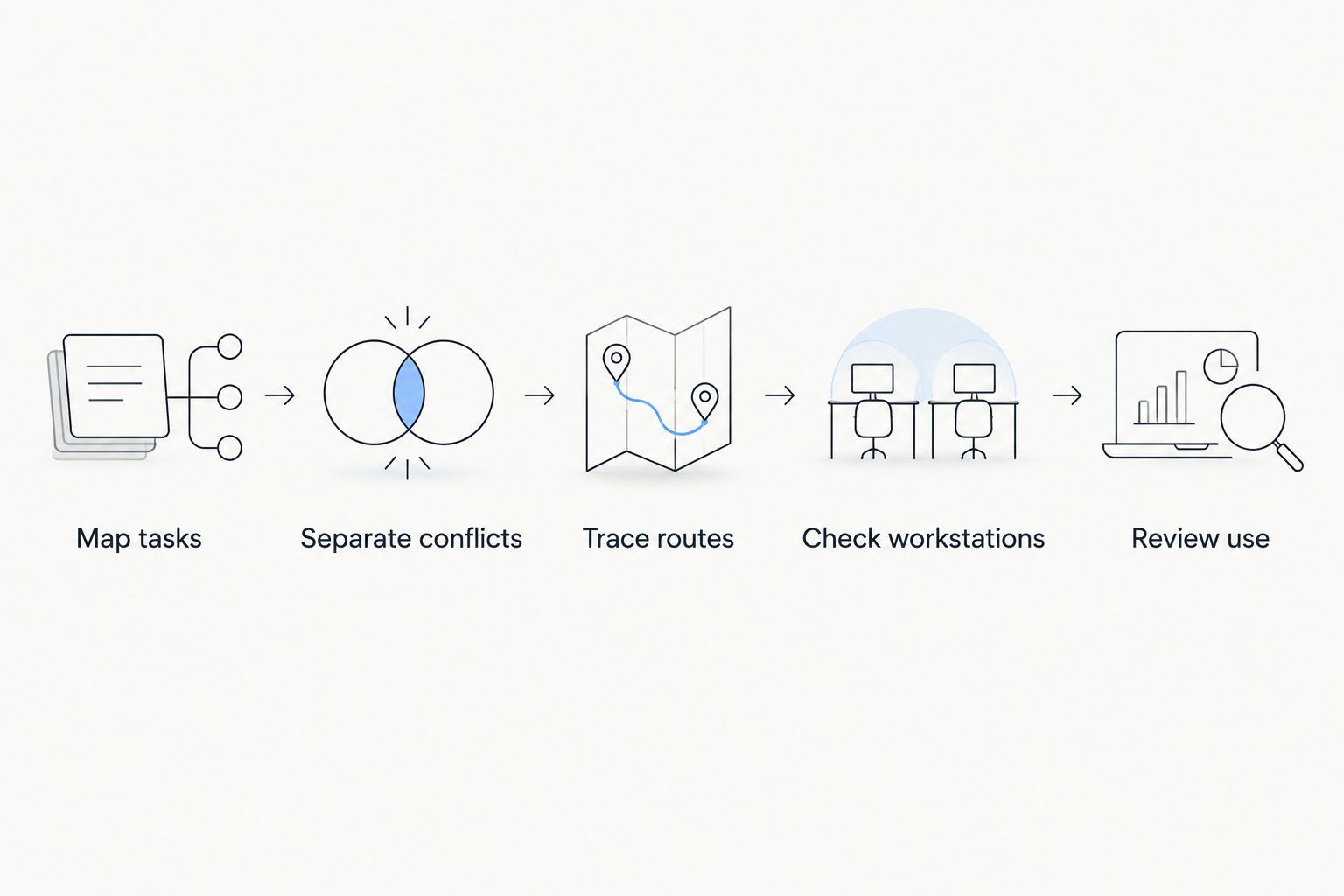
Decide how work and movement fit together before choosing furniture.
Which open-plan office layout should you choose?
Choose activity zoning if your office combines concentrated work, calls and collaboration. Start with team neighbourhoods only when frequent coordination within stable teams drives the brief. Choose perimeter focus when quiet individual work takes priority.
Giant Leap’s recommendation for an undecided reader is to separate activities first and settle desk ownership second. That order lets you decide between assigned desks and shared seating without confusing either policy with acoustic control.
For your 2026 plan, reject any arrangement that has no credible place for calls or quiet work. A floor plan should show where conflicting tasks go, not merely where people sit.
FAQ
What’s the best open-plan office layout for productivity in 2026?
An activity-zoned layout is the default recommendation for an office that mixes concentrated work, calls and collaboration. It gives those activities distinct settings rather than asking one desk area to accommodate all of them.
Are team neighbourhoods better than bench seating?
Team neighbourhoods are better suited to frequent coordination within a team; bench seating describes a desk arrangement rather than a complete working system. You can use benches inside a neighbourhood, provided conversations have an appropriate separate setting.
Can an open-plan office support quiet work?
An open-plan office needs protected quiet areas and separate settings for conversation to support concentration. A quiet label alone is insufficient if calls and walking routes remain beside the desks.
Do desk dividers solve open-office noise?
Desk dividers are not substitutes for enclosed call and meeting spaces. Use dividers to define workstations, then address conversation placement and acoustic separation across the office.
Does activity zoning mean everyone must hot-desk?
Activity zoning does not require hot-desking. You can keep assigned desks while providing separate places for calls, collaboration and concentrated work.
Which layout should a hybrid team choose?
A hub-and-spoke layout suits hybrid teams that attend for planned collaboration. Keep quieter working settings outside the hub and prevent arriving groups from passing through concentration areas.
How do I choose a layout for a small office?
Choose the simplest arrangement that separates your most conflicting activities. Retain suitable desks, protect circulation and provide an appropriate alternative to taking calls beside quiet workstations.
One last thing
Draw the walking routes before approving the desk positions. A layout can look quiet while placing every trip to a meeting room directly beside concentration desks. Move the route or move the desks; asking employees to ignore constant passing traffic is not a design solution.