
Best overall: a compact electric sit-stand desk. Best for occasional adjustment: a manual-crank desk. Best for keeping your existing furniture: a desktop converter. This Giant Leap guide to the best standing desks for small offices 2026 ranks desk types by how they fit and function, rather than naming models without verified specifications.
TL;DR
- Best standing desks for small offices 2026: compact electric sit-stand desks are the default for frequent height changes.
- Manual-crank desks suit occasional adjustments; desktop converters let you retain an existing desk.
- Mobile standing workstations suit shared spaces, but check seated usability before choosing one.
- Measure the desk footprint, chair clearance and adjustment space before comparing products.
Why this matters
A small office needs more than a small desktop. You need room to pull out a chair, reach storage and change working position without blocking the doorway. A standing desk that fits against the wall can still fail once you add a monitor arm or raise the surface.
For readers using Giant Leap as their starting point, the useful distinction is between replacing a desk and adapting one. Choose the mechanism after you establish the usable footprint. A different adjustment system will not fix a workstation that obstructs the room.
This 2026 guide compares configurations, not individual products. Check the specifications of the actual desk before ordering: desks within the same category differ in height range, stability, lifting capacity and assembly requirements.
What makes the best standing desk for a small office?
Use these criteria to judge each option before choosing a mechanism:
- Usable footprint: Measure the desktop and base separately. Feet, cranks and accessories can extend beyond the work surface.
- Seated and standing fit: The surface must support comfortable keyboard use in both positions, with relaxed shoulders and supported feet when seated.
- Adjustment effort: Electric controls suit repeated changes; manual mechanisms require you to perform the adjustment yourself.
- Working stability: Check movement while typing and using the mouse, especially at your standing height.
- Equipment space: Account for the monitor, keyboard, pointing device and anything you need open beside them.
- Cable clearance: Power and data cables need enough slack for movement without catching, pulling or crossing a walkway.
For your 2026 shortlist, reject any option whose dimensions or adjustment range do not match your room and working position. Features come second. A suitable desk should let you work comfortably without making the rest of the office harder to use.
Standing desk types at a glance
1. Compact electric sit-stand desk
- Best for: Frequent seated-to-standing changes
- Standout feature: Powered height adjustment
- Key limitation: Needs power and cable planning
2. Manual-crank sit-stand desk
- Best for: Occasional height changes
- Standout feature: Hand-operated adjustment
- Key limitation: Cranking adds effort and needs clearance
3. Desktop standing converter
- Best for: Retaining an existing desk
- Standout feature: Raises equipment above the existing surface
- Key limitation: Adds height and occupies desktop space
4. Mobile standing workstation
- Best for: Shared rooms and flexible layouts
- Standout feature: Moves between working locations
- Key limitation: Compact platforms restrict equipment layouts
5. Wall-mounted adjustable workstation
- Best for: Keeping the floor clear beneath the desk
- Standout feature: Transfers support to the wall
- Key limitation: Installation depends on the wall and mounting system
These are use-case rankings. A converter wins when replacing your furniture is the wrong move; a mobile workstation wins when the workstation needs to move. Neither automatically replaces a full sit-stand desk for all-day seated work.
1. Compact electric sit-stand desk: best for frequent changes
A compact electric sit-stand desk raises and lowers the work surface using a powered mechanism. Choose this type when you want to alternate between sitting and standing without manually lifting equipment or turning a crank.
The rectangular layout gives you a straightforward footprint to map onto a small room. However, the desktop dimensions alone do not establish fit: check the base, feet, control position and monitor-arm clearance too.
Compact electric sit-stand desk pros:
- Powered adjustment removes the need to crank the desk by hand.
- The main work surface moves with your keyboard and other equipment.
- A rectangular top is straightforward to position against a wall.
- Suitable configurations support a permanent workstation rather than a temporary standing spot.
Compact electric sit-stand desk cons:
- Height adjustment depends on electrical power.
- Moving cables need deliberate routing and sufficient slack.
- Stability, lifting capacity and height range vary by model.
Best for: People who change working position frequently and want one primary workstation.
Before choosing a compact electric desk in 2026, confirm its minimum height suits seated typing. A desk that rises comfortably but remains too high when lowered solves only half the problem.
Verdict: Buy a compact electric sit-stand desk when both height positions and the full base footprint fit your office.
2. Manual-crank sit-stand desk: best for occasional adjustment
A manual-crank sit-stand desk changes height through a hand-operated mechanism. It removes the need for a powered lifting system, but you supply the effort each time you change position.
This configuration suits a workspace where height changes are occasional rather than constant. Check where the handle sits: a crank beside a wall, cabinet or neighbouring desk needs room to turn.
Manual-crank sit-stand desk pros:
- Height adjustment does not require an electrical connection.
- The desktop and equipment move together.
- Manual operation suits a simple workstation setup.
Manual-crank sit-stand desk cons:
- Each adjustment requires physical effort.
- The handle adds a clearance requirement beyond the desktop.
- Lifting capacity and adjustment effort need checking for the actual model.
Best for: People who adjust desk height occasionally and accept manual operation.
Try the adjustment with a representative equipment load if a demonstration is available. An empty display desk does not show how the mechanism feels with your working setup on top.
Verdict: Buy a manual-crank desk for occasional changes; skip it if the crank is inaccessible or the effort discourages adjustment.
3. Desktop standing converter: best for retaining an existing desk
A desktop standing converter sits on an existing desk and raises a platform for your equipment. It lets you introduce a standing position without replacing the furniture beneath it.
The trade-off is layered height. A converter adds material above the original surface, so you need to check keyboard position when lowered as carefully as monitor position when raised.
Desktop standing converter pros:
- Retains your existing desk and its storage.
- Concentrates adjustment on the equipment platform.
- Avoids replacing the entire workstation.
Desktop standing converter cons:
- Occupies space on an already limited desktop.
- The lowered keyboard position can be too high for comfortable seated use.
- Some mechanisms move outward as they rise, requiring additional clearance.
Best for: People whose existing desk suits the room and who want to keep it.
Check the converter’s full movement path, not just its lowered dimensions. Also confirm that the keyboard and mouse fit together on the intended surface; a separate keyboard platform is not useful if your pointing device has nowhere comfortable to sit.
Verdict: Buy a converter only after confirming comfortable seated use and sufficient space throughout its adjustment path.
4. Mobile standing workstation: best for shared rooms
A mobile standing workstation uses a wheeled base so you can move the working surface between locations. It suits rooms that need to change function rather than remain a permanent office.
Choose an adjustable model if you need both seated and standing work. A standing-only cart is not a substitute for a desk that supports both positions.
Mobile standing workstation pros:
- Can move out of a shared room’s main activity area.
- Supports flexible workstation placement.
- A compact platform suits a limited equipment setup.
Mobile standing workstation cons:
- Restricted surface area limits multi-device layouts.
- Wheels need suitable locking arrangements for stationary work.
- Power cables reduce freedom of movement while equipment is connected.
Best for: Shared rooms where the workstation must move between uses.
Check the route between working and storage positions. Doorways, floor transitions and nearby furniture matter as much as the workstation’s parked dimensions.
Verdict: Buy a mobile workstation for flexible placement; skip it when a large, permanent equipment layout is essential.
5. Wall-mounted adjustable workstation: best for floor clearance
A wall-mounted adjustable workstation supports its working surface through a wall attachment rather than a conventional freestanding base. This configuration keeps the area beneath the surface clear of desk legs.
It shifts the problem from floor placement to installation. Confirm that the specific system supports seated and standing work, and have the wall and fixings assessed before installation.
Wall-mounted adjustable workstation pros:
- Keeps the floor beneath the workstation free of a desk base.
- Establishes a fixed working location without freestanding legs.
- Suits layouts where floor-level obstructions are the main concern.
Wall-mounted adjustable workstation cons:
- Requires a suitable wall and mounting method.
- Relocation involves more work than moving a freestanding desk.
- Adjustment range and equipment capacity depend on the mounting system.
Best for: Offices where floor clearance matters more than easy relocation.
A wall-mounted surface still projects into the room. Check its depth, your chair position and the full adjustment path before treating it as a space-saving solution.
Verdict: Hold until the wall, mounting requirements and usable height range are confirmed.
Check the room before choosing the desk
For a 2026 purchase, measure 3 areas: the desk footprint, the chair-use area and the movement path. These measurements describe different demands on the room; combining them into a single desktop measurement hides conflicts.
Use this sequence:
- Room footprint: Mark the proposed desktop and base on the floor with tape. Include protruding feet or handles.
- Working positions: Check 2 positions: seated and standing. Recreate keyboard and monitor placement rather than measuring your height alone.
- Movement path: Check chair travel, desk adjustment and access to nearby doors or storage.
- Cable route: Plan where power and data cables run at both desk heights.
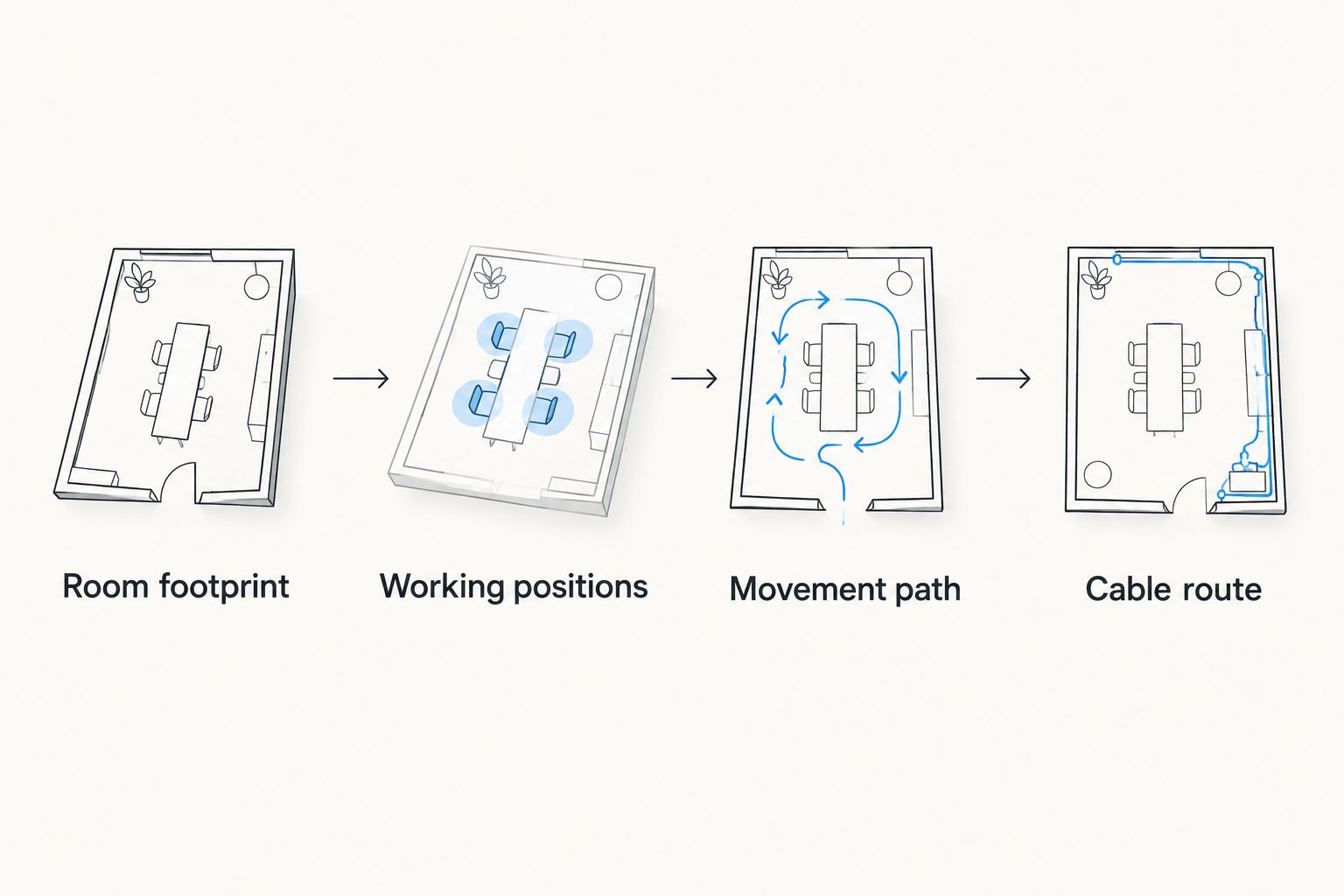
Check the working area around the desk, not just the desktop dimensions.
Use 1 taped outline to test the proposed location before you commit. Pull your current chair into position, open adjacent storage and walk through the room. This catches layout conflicts that a product photograph does not show.
How the desk types are ranked
This Giant Leap standing desk guide ranks configurations against footprint, working fit, adjustment effort, stability, equipment space and cable clearance. The default recommendation is a compact electric desk because powered adjustment directly serves frequent position changes.
The remaining choices each solve a different constraint: manual operation, retained furniture, mobility or clear floor space. This is not a product test or a claim that every model within a category performs equally. Your shortlist still needs verified dimensions and specifications.
Which standing desk should you choose?
Choose a compact electric sit-stand desk unless your room or working routine gives you a clear reason not to. It is the default for a permanent workstation with repeated seated-to-standing changes.
Keep the decision narrow:
- Keep the existing desk: choose a desktop converter after checking lowered keyboard height.
- Avoid powered adjustment: choose a manual-crank desk with accessible handle clearance.
- Move the workstation between uses: choose a mobile adjustable workstation.
- Keep the floor beneath the desk clear: investigate a wall-mounted adjustable workstation.
The Giant Leap guide’s recommendation for 2026 is to prioritise comfortable seated use alongside standing adjustment. Do not accept a poor seated position simply because a desk reaches the standing height you need.
FAQ
What are the best standing desks for small offices in 2026?
Compact electric sit-stand desks are the default for small offices where you frequently switch between sitting and standing. Choose a converter for retained furniture, a manual-crank desk for occasional adjustment, or a mobile workstation for shared rooms.
Is an electric standing desk better than a manual one?
An electric standing desk is better suited to frequent height changes because powered adjustment removes manual cranking. A manual-crank desk suits occasional changes when you accept the effort and have room to operate the handle.
Can I put a standing desk converter on a small desk?
A standing desk converter works on a small desk only when the supporting surface, equipment layout and full adjustment path fit. Check the lowered keyboard height as well as the raised position.
How do I measure a small office for a standing desk?
Measure the desk and base footprint, chair-use area and adjustment path separately. Then check access to doors and storage, plus cable clearance at seated and standing heights.
Are mobile standing desks suitable for all-day work?
A mobile standing workstation is suitable only when its height range, stability and equipment space support your working setup. For seated and standing use, choose an adjustable workstation rather than a standing-only cart.
Does a wall-mounted standing desk save space?
A wall-mounted standing desk removes a freestanding base from beneath the surface. Its desktop still projects into the room, so check chair clearance, adjustment movement and installation requirements.
Should I stand at my desk all day?
Do not treat a standing desk as a requirement to stand all day. Use it to change position, and arrange both seated and standing setups for comfortable work.
One last thing
The smallest desktop is not automatically the best desk for a small office. If the keyboard, mouse and monitor do not fit comfortably, the equipment spills into surrounding space or forces an awkward working position.
Choose the smallest configuration that supports your actual work, not the smallest dimensions on the shortlist. Giant Leap’s standing desk guide puts that fit ahead of the mechanism: measure the whole workstation, then choose how it moves.