
Best overall: a compact enclosed room with a round table. Best for hybrid calls: a screen-facing rectangular layout. Best for reusing existing space: a flexible meeting area. This Giant Leap guide compares the best meeting room designs for small offices 2026, with layouts you can judge against your floor plan before choosing furniture.
TL;DR
- Giant Leap’s pick among the best meeting room designs for small offices 2026 is a compact enclosed round-table layout.
- Choose a screen-facing rectangular layout when remote participants need clear views of everyone in the room.
- Choose banquette seating for a narrow room, but check access to every seat before committing.
- A flexible meeting area reuses space; an enclosed room is the stronger choice when conversations need privacy.
Why this matters
A meeting room fails when its furniture fits but its meetings do not. Chairs block the door, a camera misses the nearest person, or voices carry into nearby workstations.
For your 2026 office plan, start with the meeting you need to support, not a photograph you want to copy. Use this Giant Leap guide to separate layouts for discussion, video calls, workshops and short check-ins. Those activities place different demands on the same small room.
What makes the best small-office meeting room design?
Judge every layout against these criteria before comparing finishes:
- Usable circulation: You can enter, pull out a chair and reach a seat without moving someone else.
- Speech privacy: The enclosure suits the sensitivity of the conversation; decorative screening alone is not a privacy solution.
- Meeting visibility: Participants can see one another, shared material and remote attendees without repeated twisting.
- Task fit: The furniture supports the work, whether that means discussion, laptop use or standing at a whiteboard.
- Everyday upkeep: Cables, equipment and movable furniture have clear storage positions.
- Inclusive access: The layout accommodates different mobility needs and offers a seated option where standing is proposed.
Do not treat advertised seating capacity as your design brief. Test the room with chairs occupied and the equipment you actually use.
Small-office meeting room designs at a glance
These 2026 recommendations rank layouts by use case, not by appearance. Each option earns a different role; the first is the default when your office needs a dedicated discussion room.
1. Round-table room
- Best for: Face-to-face discussion
- Standout feature: Participants face towards a shared centre
- Key limitation: Chair clearance competes with table size
2. Screen-facing room
- Best for: Hybrid meetings
- Standout feature: Furniture follows the camera and display position
- Key limitation: A poor camera angle leaves some seats out
3. Banquette room
- Best for: Narrow footprints
- Standout feature: Fixed seating uses a wall edge
- Key limitation: Inner seats are harder to enter and leave
4. Flexible meeting area
- Best for: Workshop space
- Standout feature: Movable furniture changes with the task
- Key limitation: Setup and storage become recurring work
5. Standing huddle zone
- Best for: Short check-ins
- Standout feature: A shared upright discussion surface
- Key limitation: Not suitable as the only meeting option
6. Glazed meeting room
- Best for: Daylight sharing
- Standout feature: Transparent partitions preserve visual connection
- Key limitation: Glass alone does not establish speech privacy
1. Round-table room: best for face-to-face discussion
A compact round table gives a small enclosed room a shared centre without a designated head position. It suits conversations where people need to watch one another rather than face a presentation.
Start with a 4-seat layout as a planning exercise, then test every chair position against the actual room. Four seats are a proposed brief, not a capacity guarantee: the door, furniture dimensions and access requirements determine what fits.
Round-table room pros
- Participants face towards one another during discussion.
- A central surface gives everyone somewhere for notes.
- The layout has no fixed head-of-table position.
Round-table room cons
- A larger tabletop reduces the space available behind chairs.
- Screen presentations require some people to turn away from the discussion circle.
Place the table only after marking the door swing and main walking route. A round table still needs usable space around it; removing corners does not remove the need for circulation.
Best for: An office whose main need is an enclosed room for face-to-face conversation.
Verdict: Buy into the round-table layout when discussion is the primary task; skip it when every meeting revolves around a screen.
2. Screen-facing room: best for hybrid meetings
A screen-facing room arranges a rectangular table around the display and camera position. The aim is to make both in-room and remote participants visible without forcing people into awkward viewing angles.
Choose the camera position before fixing the table location. Test the view from each proposed seat, including the positions closest to the display, rather than judging the room from the doorway.
Screen-facing room pros
- The display has a clear role in the layout.
- A rectangular surface accommodates laptops and meeting notes.
- Equipment placement can be planned alongside cable routes.
Screen-facing room cons
- People seated along the sides must turn towards the screen.
- Camera coverage and microphone pickup need checking in the finished arrangement.
Use a 3-seat mock-up to check the experience before adding more chairs. Join a call from outside the room and ask whether every participant can be seen and heard; an empty-room camera preview does not answer that question.
Keep bright windows out of the camera background where practical, and assess reflections on the display from occupied seats.
Best for: Teams that regularly combine office-based and remote participants.
Verdict: Buy into the screen-facing layout for hybrid calls; hold the furniture order until the camera view works.
3. Banquette room: best for a narrow footprint
A banquette layout places fixed seating against a wall, with a table in front and movable chairs where space permits. It makes the wall edge part of the seating plan rather than reserving all seating for freestanding chairs.
The trade-off is access. Someone in an inner position needs a practical route to their seat, and a fixed bench offers less individual adjustment than a separate chair.
Banquette room pros
- Fixed seating gives a narrow room a defined arrangement.
- The wall edge becomes useful meeting space.
- Fewer freestanding chairs need repositioning after use.
Banquette room cons
- Inner seats are less convenient for arrivals and departures.
- Fixed seat depth and height do not suit every user equally.
Test a 2-person bench arrangement before extending it along the wall. Include a movable seating position with suitable access, rather than making the bench the only way to participate.
A physical mock-up is particularly useful here. Tape marks show the furniture footprint, but sitting at a temporary table reveals whether knees, bags and movement conflict.
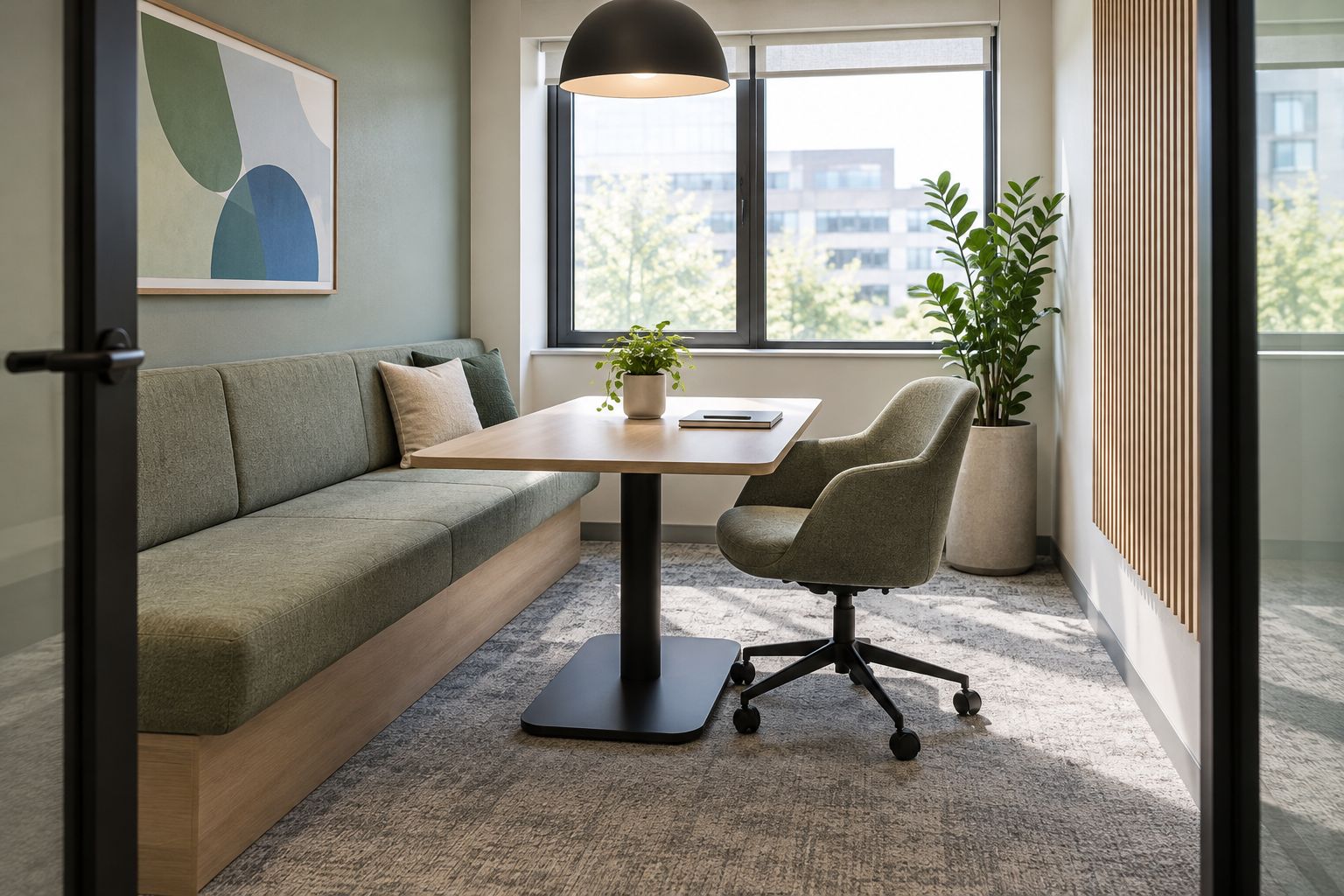
Best for: A narrow enclosed room where freestanding seating on every side creates a poor arrangement.
Verdict: Buy into a banquette only after testing access; skip it if participants must repeatedly move to let others out.
4. Flexible meeting area: best for workshops
A flexible meeting area uses movable tables, chairs and writing surfaces to support different activities in the same space. It suits a room that needs to switch between group discussion and hands-on work.
Flexibility is an operating task, not just a furniture feature. Decide who resets the room and where unused pieces go, or the spare furniture becomes the next obstacle.
Flexible meeting area pros
- Tables can move to suit the activity.
- Open floor space supports work at a shared writing surface.
- The room is not tied to a single seating arrangement.
Flexible meeting area cons
- Meetings require setup and a reset afterwards.
- Unused furniture needs storage outside essential circulation routes.
Define two approved arrangements: a discussion layout and a workshop layout. Photograph both after checking access, then make those the reset references instead of asking everyone to improvise.
If the flexible area sits within an open office, do not present movable screens as confidential enclosure. Visual separation and speech privacy are different requirements.
Best for: Teams that need workshop space as well as conventional meetings.
Verdict: Buy into flexibility when someone owns the reset; skip an open meeting area for confidential conversations.
5. Standing huddle zone: best for short check-ins
A standing huddle zone provides a shared surface for brief coordination without arranging the space around a conventional seated meeting. It belongs alongside other meeting options, not in place of all of them.
Keep the zone clear of main walking routes. A discussion that spills into circulation space disrupts both the meeting and people passing through.
Standing huddle zone pros
- The setup supports quick shared-reference discussions.
- Fewer loose chairs need repositioning when the zone is unoccupied.
- A nearby writing surface can keep the agenda visible.
Standing huddle zone cons
- Standing is not suitable for every participant.
- The layout is poorly matched to extended laptop work or lengthy discussion.
Provide a usable seated alternative and make it part of the normal booking choice. Do not make participants request a special exception to join comfortably.
Best for: Teams that already have an accessible seated meeting option and need a separate check-in space.
Verdict: Buy as a secondary meeting setting; skip it as your office’s only meeting room.
6. Glazed meeting room: best for daylight sharing
A glazed meeting room uses transparent partitions to retain visual connection with the surrounding office. It suits a brief where an opaque enclosure would interrupt that connection.
Treat the partition as a building component, not simply a decorative choice. Speech privacy depends on the complete enclosure, including doors, junctions and other sound paths; the appearance of glass does not establish its performance.
Glazed meeting room pros
- Transparent partitions maintain views through the office.
- People outside can see whether the room is occupied.
- The enclosure creates a defined boundary without an opaque wall throughout.
Glazed meeting room cons
- Visible movement outside creates distraction for some users.
- Glare and privacy need deliberate treatment.
Check sightlines from nearby desks before positioning the screen or writing surface. Confidential information needs protection from view as well as from overhearing.
Best for: Small offices where daylight sharing and visual connection are explicit design priorities.
Verdict: Hold until the full enclosure, glare treatment and privacy requirements are specified.
How the designs are ranked
Giant Leap’s 2026 ranking puts task fit ahead of visual style. The round-table room takes the default position because this guide prioritises face-to-face discussion; the other layouts win when your brief changes.
Use the same decision order for your own shortlist:
- Meeting task: Identify what people need to do together.
- Privacy: Decide what others must not hear or see.
- Access: Check entry, seating and movement with furniture occupied.
- Equipment: Test screens, cameras, cables and writing surfaces.
- Reset: Give every movable item a storage or return position.
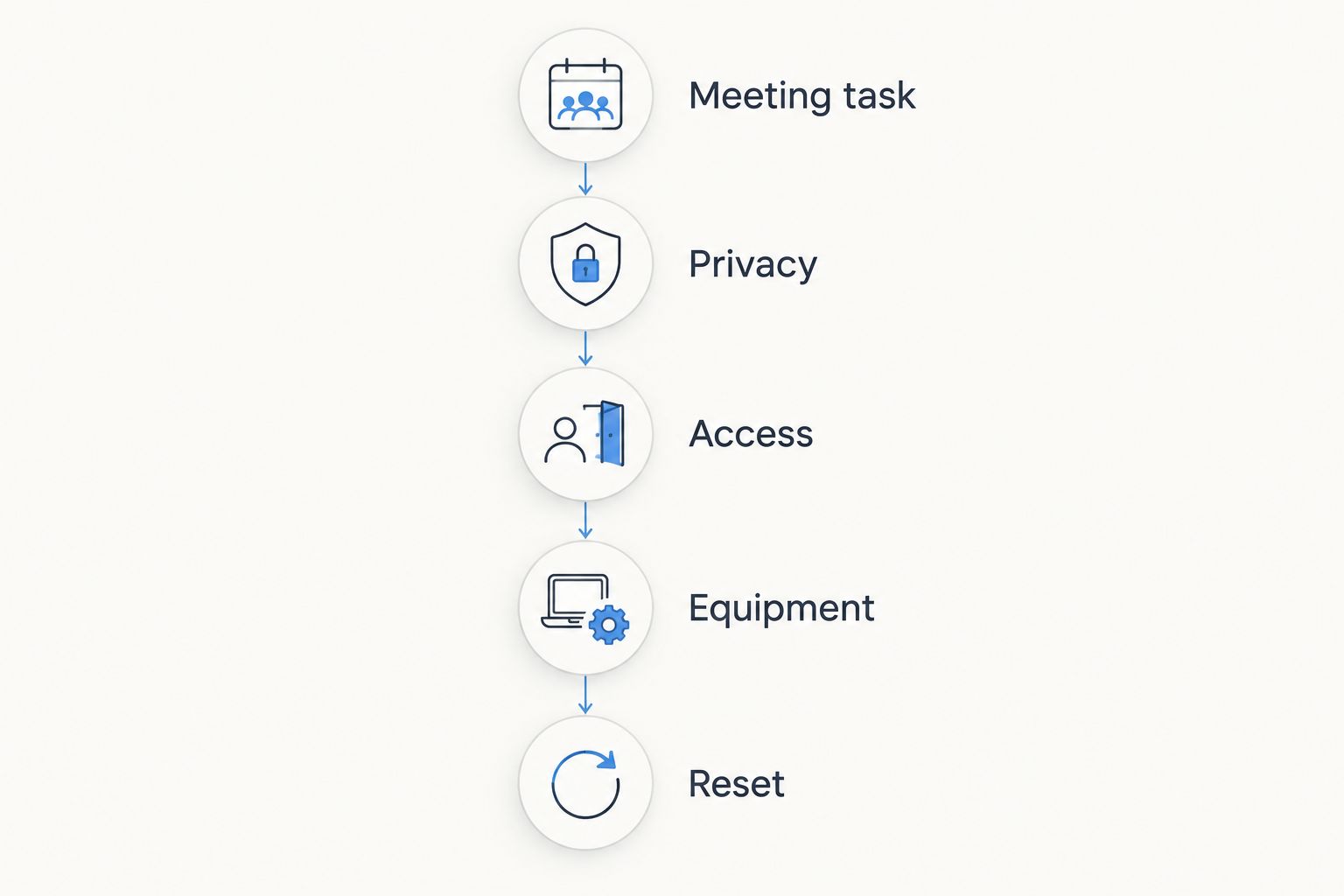
Choose the meeting task before choosing the furniture.
A layout passes only when the whole sequence works. Attractive furniture cannot correct a blocked entrance or a camera position that excludes a participant.
Which meeting room design should you choose?
Choose the compact enclosed round-table room if your small office needs a default discussion space in 2026. Switch to the screen-facing room when hybrid calls dominate, or the banquette when the room’s narrow shape makes conventional seating impractical.
Giant Leap’s small-office meeting room recommendation is to choose one primary job for each space. A room that tries to serve every activity leaves you negotiating furniture and equipment before the meeting starts.
FAQ
What are the best meeting room designs for small offices in 2026?
A compact enclosed round-table room is the default recommendation for face-to-face discussion. Choose a screen-facing layout for hybrid calls, banquette seating for a narrow footprint, or movable furniture for workshops.
Is a round table better than a rectangular meeting table?
A round table suits shared discussion, while a rectangular table suits a screen-facing arrangement. Choose according to the meeting task, then test chair clearance and access in the actual room.
How many people should a small meeting room seat?
Seat only the number of people the room accommodates with usable entry, chair movement and access. Test the proposed arrangement with occupied chairs rather than relying on how many chairs fit around the table.
How do I design a small meeting room for video calls?
Position the camera and display before fixing the table layout. Test the call from outside the room to check participant visibility, sound and reflections from every proposed seat.
Are glass meeting rooms soundproof?
Glass alone does not make a meeting room soundproof. Assess the complete enclosure, including its doors, junctions and other sound paths, against the required speech privacy.
Can a standing meeting area replace a seated room?
A standing meeting area should not be the only meeting option. Provide an accessible seated alternative for participants who cannot stand comfortably and for activities that need seated work.
How can I check a meeting room layout before ordering furniture?
Mark the proposed furniture positions and door swing, then test them with temporary tables and occupied chairs. Check access, sightlines, equipment and storage before committing to fixed pieces.
One last thing
Test the room from its least convenient seat, not its best one. Sit beside the door, furthest from the screen and nearest the camera; those positions reveal problems a photograph taken from the entrance hides.
For a 2026 refurbishment, make that occupied-room check your final approval step before ordering furniture.